Shorts feel cinematic
Timed beats, frame prompts, motion/FX cues, caption notes, sound moments, and a release prompt.

See the output before you sign up
Examples should prove the product in seconds. Each one starts with a creator problem, then shows the packet pieces you can actually record, design, edit, publish, save, and reuse.
Rough idea
goes in
Full packet
comes out
Private Vault
saves it
Refresh
only what needs work
Every example includes
Proof you can inspect
This page is not a mood board. The examples expose the working parts, so you can see whether Creator Factory understands the difference between video, static, editorial, Threads, and LinkedIn production.
Shorts feel cinematic
Timed beats, frame prompts, motion/FX cues, caption notes, sound moments, and a release prompt.
Long video stays long
Chapters, visual resets, B-roll/motion coverage, proof beats, and a complete 10-minute structure.
Remix stays original
Imported work becomes a new packet with a new proof object, motion cues, and a repeat rule that does not copy wording.
Non-video stays non-video
Carousel cards and article sections get format QA instead of fake video timing or borrowed B-roll.
Three fast reads
 Ready to use
01 YouTube Shorts
Input
A dark cinematic survival Short about what happens inside your body when you are lost in the desert.
Output
A complete 60-second dark-cinematic Shorts packet with twelve timed beats.
Use it to
When the Desert Makes Your Body Turn Against You
 Ready to use
02 YouTube video
Input
A creator with a stagnant tutorial channel needs a 10-minute video showing how to rebuild the format without changing niches.
Output
A complete 10-minute video structure with chapter timing and concrete visual resets.
Use it to
Do This Before You Change Your YouTube Niche
 Ready to use
03 Remix packet
Input
A creator imports an old high-performing post and wants a fresh short using the same repeat rule without copying the wording.
Output
Shows imported-work memory with a real new script, not a paraphrase of the old post.
Use it to
How to Remix a Winning Post Without Copying It

01 Cinematic survival short
Stories Factory
Format
YouTube Shorts
Structure
12 beats
Visuals
12 frames
Production
5 cues
Rough idea
A dark cinematic survival Short about what happens inside your body when you are lost in the desert.
A complete 60-second dark-cinematic Shorts packet with twelve timed beats.
The script uses a clear internal timeline so the viewer can feel the body breakdown escalating.
Each beat has its own visual frame, anatomy cue, and edit check instead of generic scene coverage.
Creator can record
What if the desert did not kill you first - your own body did?
Creator can plan
0-5s - Hook: skeleton anatomy character alone on a white-hot desert road, heat shimmer swallowing the horizon.
Creator can design
Frame 01: 9:16 low wide desert road, expressive anatomy skeleton character centered, heat shimmer, hard noon sun, empty horizon, cinematic survival tone.
Creator can publish
Dehydration is not just thirst. It is your cooling system failing one decision at a time.
Creative Brief
A 60-second vertical survival Short for viewers who like human limits, extreme body conditions, and dark cinematic anatomy storytelling. The angle is not 'the desert is hot.' It is: dehydration turns the body into the threat. The packet tracks one visible physical failure every five seconds, keeps the skeleton character readable, and uses the final line to make the viewer rewatch the escalation.
Hooks
4 options
What if the desert did not kill you first - your own body did?
The scariest part of dehydration is not thirst. It is the bad decisions that come after.
At first you sweat. Then your body starts choosing what it can afford to lose.
The desert does not need a monster. It waits for your cooling system to fail.
Paste-ready narration
VOICEOVER - paste-ready What if the desert did not kill you first... Your own body did? 30 minutes in: Your mouth dries out. Sweat pours off you. Your blood volume starts dropping. The sun is not just heating your skin. It is breaking your cooling system. 2 hours in: Your muscles cramp. Your heart works harder to move less fluid. Your brain starts making bad decisions feel smart. That shadow looks close. It is not. 6 hours in: Your central nervous system starts misfiring. Hands shake. Vision pulses. Your body is saving water by giving up control. Then comes the worst sign. You stop sweating. No sweat means no cooling. No cooling means your core temperature keeps climbing. The desert did not beat you with teeth. It made your body choose what fails first.
Timed beats
12 beats
0-5s - Hook: skeleton anatomy character alone on a white-hot desert road, heat shimmer swallowing the horizon.
5-10s - Mouth dries: cracked lips, dry tongue, and the first hard swallow under brutal sun.
10-15s - Sweat spike: sweat flashes off skin as the cooling system starts losing the fight.
15-20s - Blood thickens: simple internal flow overlay tightens around the chest and neck.
20-25s - First cramps: calf and hand lock up while the character tries to keep walking.
25-30s - Heart strain: pulse graphic accelerates while each step covers less ground.
30-35s - Bad decision beat: false shade appears close, but the road bends away in heat haze.
35-40s - Nervous-system glitch: red pulse lines flicker across spine and skull.
40-45s - Hands shake: close shot of trembling fingers dropping a nearly empty bottle.
45-50s - Vision pulse: frame tunnels and brightens as the desert sound thins out.
50-55s - The crash: the character stops sweating under overhead sun.
55-60s - Final wide: tiny figure in the desert, caption hit: 'Your body chooses what fails first.'
Visual direction
12 frames
Frame 01: 9:16 low wide desert road, expressive anatomy skeleton character centered, heat shimmer, hard noon sun, empty horizon, cinematic survival tone.
Frame 02: extreme close-up, cracked lips and dry jawline, pale dust on face, white-hot background blown slightly, one clean caption-safe area.
Frame 03: sweat beads evaporating off shoulder and skull edge, tiny vapor shimmer, harsh rim light, minimal desert texture.
Frame 04: chest-level anatomy overlay, darker blood-flow lines tightening, character still upright but tense, no clutter behind the body.
Frame 05: hand and calf cramp insert, fingers curling around an empty bottle, sand grains sharp in foreground.
Frame 06: heart-strain frame, red pulse ring around rib cage, character taking one heavy step, camera slightly below eye line.
Frame 07: mirage frame, false patch of shade bends in the distance, road perspective warped by heat, character reaching toward it.
Frame 08: nervous-system frame, spine and skull pulse lines flicker red, background darkens orange, readable silhouette.
Frame 09: trembling-hand close-up, bottle slipping, dust catching the light, shallow focus and caption-safe top third.
Frame 10: vision-pulse frame, tunnel vignette, overexposed sun, character blurred at edges but face/body language readable.
Frame 11: no-sweat crash frame, character kneeling, skin/bone surface dry, internal heat shown as a simple red core.
Frame 12: final wide shot, tiny character against massive desert, long shadow, bold empty space for final caption.
Motion / FX Pass
5 cues
0-5s: slow push through heat haze; let the skeleton enter with no title card before the hook lands.
10-20s: sweat vapor and blood-flow overlays should appear for one beat only, then cut before they feel like medical wallpaper.
25-40s: pulse graphics accelerate in two steps; add the nervous-system flicker only after the bad-decision mirage.
40-50s: use a short handheld shake on the bottle drop, then narrow the frame for the vision-pulse beat.
50-60s: remove ambient detail when sweating stops; hold the final wide long enough for the caption to read.
Edit Pass
Runtime pass: keep twelve 5-second beats; no beat may carry more than one body change.
Caption pass: use only four timeline cards: 30 minutes, 2 hours, 6 hours, the crash.
Visual pass: every frame must show either desert pressure or internal body failure, never generic walking footage.
Overlay pass: anatomy graphics stay simple and readable at phone size; no busy medical diagrams.
Sound pass: start with wind and pulse, add tinnitus at the nervous-system beat, then thin the audio when sweating stops.
Ending pass: hold the final wide for the last line; do not add a subscribe CTA over the payoff.
Release Sheet
Title
When the Desert Makes Your Body Turn Against You
Thumbnail
Tiny skeleton anatomy character on a white-hot desert road, red core heat glow, text: 'Your body turns first.'
Caption
Dehydration is not just thirst. It is your cooling system failing one decision at a time.
Hashtags
#survival #humanbody #shorts #cinematic
Pinned comment
Which warning sign would scare you first: cramps, bad decisions, shaking hands, or when sweating stops?

02 Long video
Education Factory
Format
YouTube video
Structure
11 chapters
Visuals
11 frames
Production
5 resets
Rough idea
A creator with a stagnant tutorial channel needs a 10-minute video showing how to rebuild the format without changing niches.
A complete 10-minute video structure with chapter timing and concrete visual resets.
The example repairs a real creator problem instead of giving vague strategy advice.
The release package matches the actual video promise.
Creator can record
Your niche might be fine. Your episode format might be the thing failing.
Creator can plan
0:00-0:45 - Cold open: messy channel map, host says not to change niches yet.
Creator can design
Thumbnail: messy tutorial list on left, clean repeatable episode template on right, text: 'Don't change niche yet.'
Creator can publish
Before you change niches, audit the promise your last ten uploads trained viewers to expect.
Full packet available
Open the complete brief, hooks, script, structure, visuals, motion/QA pass, edit pass, and release sheet.
Creative Brief
A 10-minute YouTube strategy video for creators who think their niche is dead when the real problem is that every upload has a different promise. The packet gives the host a visible audit method: diagnose ten past titles, isolate the broken slot, rebuild one repeatable episode format, and leave the viewer with a three-upload test before they change niches.
Hooks
4 options
Your niche might be fine. Your episode format might be the thing failing.
Before you delete the channel plan, audit the promise your last ten titles made.
A dead tutorial channel usually has one broken slot: promise, proof, pacing, or packaging.
Do not change niches until the same promise fails three cleaner tests.
Chaptered host script
CHAPTERED HOST SCRIPT - production-ready 0:00 Cold open If every upload feels like starting over, do not change niches yet. First, check whether your show has a repeatable episode format. A niche is what the channel is about. A format is the promise the viewer learns to trust. 0:45 The title audit Open your last ten uploads. Do not judge views yet. Highlight the promise in each title. If one video promises speed, one promises tools, one promises motivation, and one promises a rant, the viewer cannot learn what they return for. 2:00 Decision one: promise Write the sentence before the next title: I help this viewer get this outcome without this pain. For a tutorial channel, that might be: I help newer editors fix one weak video moment without rebuilding the whole workflow. 3:20 Decision two: proof Now choose the proof object. Screen recording. Before-after. Timeline teardown. Template. Live rebuild. If the viewer cannot see the fix, the episode is still just advice. 4:50 Decision three: pacing Use four slots every time: problem, diagnosis, fix, test. The topic changes. The rhythm stays familiar. 6:20 Decision four: packaging The title and thumbnail must sell the same promise the video proves. If the title says retention, show the retention problem getting rebuilt. 7:40 Example rebuild 'Fix Your First 10 Seconds in CapCut' becomes 'I Rebuilt a Low-Retention Short in 12 Minutes.' Same niche. Stronger proof. Clearer promise. 8:50 The three-upload test Run the same promise three cleaner ways. Change one slot at a time: opener, proof, pacing, or CTA. 9:40 Close If those three tests fail, you have evidence. Until then, your niche is not dead. Your format just has not been built yet.
Chapter plan
11 chapters
0:00-0:45 - Cold open: messy channel map, host says not to change niches yet.
0:45-1:30 - Pull up ten recent titles and highlight the promise inside each one.
1:30-2:15 - Sort the promises into mismatched piles: speed, tools, motivation, rant, tutorial.
2:15-3:10 - Write the repeatable promise sentence on screen and tighten it twice.
3:10-4:05 - Choose a proof object: screen recording, before-after, teardown, template, or live rebuild.
4:05-5:05 - Show why talking about a fix is weaker than showing the broken moment first.
5:05-6:10 - Build the four-slot episode format: problem, diagnosis, fix, test.
6:10-7:05 - Match title and thumbnail to the actual proof the video delivers.
7:05-8:25 - Rebuild the CapCut example into a proof-led episode package.
8:25-9:20 - Lay out the three-upload test and the one-variable rule.
9:20-10:00 - Close on the decision: keep the niche, test the format, then judge with evidence.
Visual direction
11 frames
Thumbnail: messy tutorial list on left, clean repeatable episode template on right, text: 'Don't change niche yet.'
B-roll: blurred channel dashboard with ten titles stacked vertically, each promise highlighted in a different color.
Graphic: promise mismatch board with five labeled piles and one empty slot called 'repeatable promise.'
On-screen worksheet: sentence template 'I help [viewer] get [outcome] without [pain]' filled in live.
Proof-object menu: screen recording, teardown, before-after, template, live rebuild shown as five selectable cards.
Timeline capture: weak first ten seconds marked with a red bracket before the fix appears.
Motion graphic: four-slot episode template snapping into place: problem, diagnosis, fix, test.
Title board: original title crossed out; rebuilt title beside a matching thumbnail promise.
Example package: rebuilt CapCut episode shown as title, opening frame, proof object, and CTA.
Test tracker: three upload rows with only one variable changing per row.
End card: 'Niche verdict after 3 cleaner tests' with the first test highlighted.
Motion / B-roll Pass
5 resets
0:00-1:30: keep the title audit on screen while the host explains the difference between niche and format.
2:15-4:05: alternate worksheet writing with dashboard inserts so the promise/proof decisions do not become talking-head filler.
5:05-7:05: animate the four-slot format once, then reuse the same board as a visual anchor every 90 seconds.
7:05-8:25: show the CapCut rebuild as a real timeline before revealing the new title package.
8:25-10:00: move from test tracker to end card; no extra motivational montage after the evidence rule.
Edit Pass
Object pass: every minute needs a visible work object, not just the host talking.
Audit pass: title examples must show promise mismatch before the fix is introduced.
Template pass: keep the four-slot format visible from 5:05 onward so viewers can copy it.
Pacing pass: reset every 90 seconds with either a board, worksheet, or before-after frame.
Specificity pass: remove motivational lines unless they name promise, proof, pacing, packaging, or test.
Close pass: end on the three-upload test, not a vague reassurance about consistency.
Release Sheet
Title
Do This Before You Change Your YouTube Niche
Thumbnail
Messy channel map becoming one repeatable episode template, with 'Don't change niche yet' as the main readable text.
Caption
Before you change niches, audit the promise your last ten uploads trained viewers to expect.
Hashtags
#YouTubeStrategy #CreatorTips #ContentStrategy
Pinned comment
Which slot is weakest in your current format: promise, proof, pacing, packaging, or the three-upload test?

03 Imported work
Clip Factory
Format
Remix packet
Structure
11 beats
Visuals
11 frames
Production
5 cues
Rough idea
A creator imports an old high-performing post and wants a fresh short using the same repeat rule without copying the wording.
Shows imported-work memory with a real new script, not a paraphrase of the old post.
Separates repeat rule from wording so the remix earns its existence.
Protects against copy-paste output by forcing a new proof object.
Creator can record
The old post worked because of the contrast, not the exact words.
Creator can plan
0-5s - Old post appears blurred; only structure labels are readable: mistake, reframe, action.
Creator can design
Frame 01: blurred old post on black background, only three overlay labels visible: mistake, reframe, action.
Creator can publish
The move is not to copy the winner. It is to keep the rule, replace the proof, and build a fresh example.
Full packet available
Open the complete brief, hooks, script, structure, visuals, motion/QA pass, edit pass, and release sheet.
Creative Brief
A 55-second remix packet for creators who want to learn from a winning post without cloning it. The old post is treated as private structure, not public copy: identify the contrast, extract the repeat rule, replace the proof object, and build a fresh short that earns its own hook, visuals, and release package.
Hooks
4 options
The old post worked because of the contrast, not the exact words.
Keep the rule. Replace the proof. That is the remix.
If you copy the wording, you learned nothing from the winner.
The hook is not broken until the proof object fails.
Script
VOICEOVER - paste-ready This old post did not win because of the exact words. It won because of the order. It separated the thing creators keep changing from the thing that actually needed to change. So we are not copying it. We are extracting the rule. Old rule: Stop rebuilding the whole system when one slot is broken. New example: A creator keeps rewriting hooks because three videos opened weak. But I would not check the hook first. I would check the proof object. If the video says, 'I fixed this edit,' but the viewer never sees the broken edit, the hook has nothing to sell. Bad version: You need better hooks. Better version: Show the broken first five seconds. Then rebuild it on screen. Now the hook has evidence behind it. That is the remix: Proof first. Hook second. Payoff last.
Timed beats
11 beats
0-5s - Old post appears blurred; only structure labels are readable: mistake, reframe, action.
5-10s - Highlight the winning contrast: creators change the whole system when one slot broke.
10-15s - Pull the repeat rule into a clean center card.
15-20s - Introduce the new example: weak hooks after three soft openings.
20-25s - Show the wrong diagnosis: 'rewrite the hook' stamped as too early.
25-30s - Show the proof-object diagnosis: no broken edit is visible yet.
30-35s - Bad version frame: advice appears before evidence.
35-40s - Better version frame: broken first five seconds appears before the hook.
40-45s - Rebuild frame: proof, hook, payoff snap into order.
45-50s - New short package appears with title, caption, and visual opener.
50-55s - End on the reusable rule card: Proof first / Hook second / Payoff last.
Visual direction
11 frames
Frame 01: blurred old post on black background, only three overlay labels visible: mistake, reframe, action.
Frame 02: high-contrast split card, 'whole system' crossed out, 'one slot' circled.
Frame 03: repeat-rule extraction card, clean white text on dark background, no old wording copied.
Frame 04: new example board showing three weak openings as small vertical thumbnails.
Frame 05: red-stamped diagnosis card: 'rewrite the hook' marked too early.
Frame 06: proof-object audit frame, empty evidence slot highlighted before the script line.
Frame 07: bad-version comparison, advice text floating with no visual proof behind it.
Frame 08: better-version comparison, broken edit timeline shown first with the weak first five seconds bracketed.
Frame 09: modular order graphic: Proof first, Hook second, Payoff last snapping into place.
Frame 10: release package mockup with title, caption, thumbnail frame, and pinned comment as separate tiles.
Frame 11: final saved-rule card, simple three-line system, fuchsia active border, no extra decoration.
Motion / FX Pass
5 cues
0-10s: old post stays blurred while labels snap on; do not reveal the original wording for more than a cropped fragment.
10-20s: repeat-rule card slides out of the old post, then the new weak-hook example replaces it cleanly.
20-35s: use red stamp, empty evidence slot, and timeline bracket as three separate beats instead of stacking them.
35-45s: proof, hook, and payoff tiles snap into order with one short sound hit per tile.
45-55s: release package appears as saved packet tiles, then resolves to the reusable rule card.
Edit Pass
Originality pass: old post wording stays blurred or cropped; only structure labels are readable.
Timing pass: keep eleven 5-second beats so the 55-second remix does not collapse into a caption stack.
Proof pass: the broken edit must appear before any hook advice appears.
Contrast pass: every comparison must name what stayed and what changed.
Language pass: avoid 'repurpose content'; say repeat rule, proof object, new example.
Ending pass: finish on the new reusable rule, not a recap of the old post.
Release Sheet
Title
How to Remix a Winning Post Without Copying It
Thumbnail
Blurred old post becoming a new proof-first short template, text: 'Reuse the rule.'
Caption
The move is not to copy the winner. It is to keep the rule, replace the proof, and build a fresh example.
Hashtags
#ContentRepurposing #CreatorWorkflow #Shorts
Pinned comment
Drop a post that worked. What repeat rule do you think was hiding underneath it?
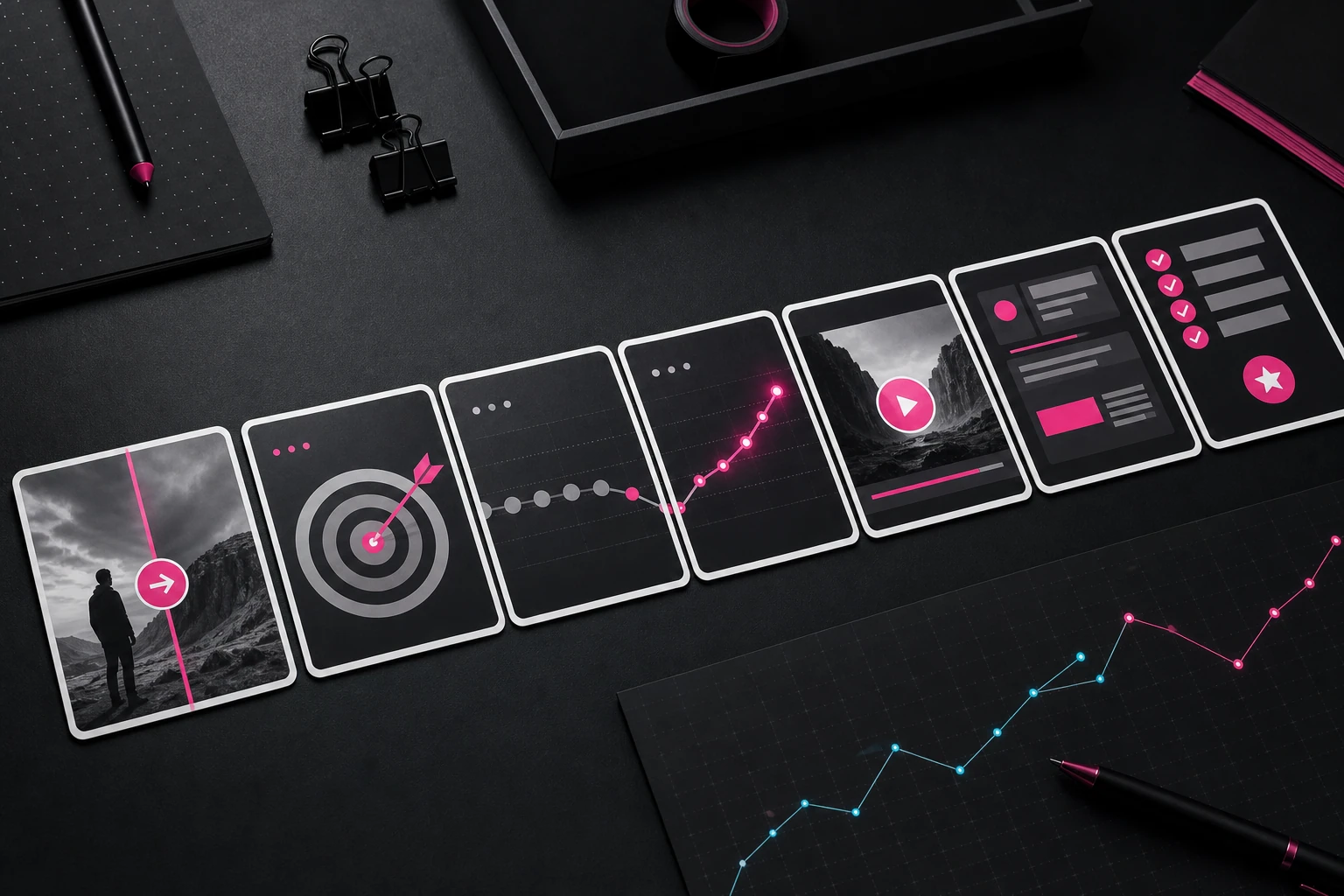
04 Carousel
Style Factory
Format
Instagram carousel
Structure
7 cards
Visuals
7 cards
Production
4 checks
Rough idea
A creator needs an Instagram carousel explaining why three weak posts are not enough evidence to kill a format.
Carousel-specific: seven finished cards, one decision per slide, and a saveable final checklist.
Reframes the rebuild instinct into a diagnosis flow: opener, proof, pacing, or CTA.
Every visual direction maps to its card instead of using generic carousel styling.
Creator can record
Your format might not be bad. It might just be untested.
Creator can plan
Slide 1 - Cover: Your format might not be bad yet.
Creator can design
Slide 1 visual: bold cover, black editorial background, one broken format block repaired by a fuchsia signal line.
Creator can publish
Before you quit the format, test the same promise three cleaner ways and change only one slot at a time.
Full packet available
Open the complete brief, hooks, script, structure, visuals, motion/QA pass, edit pass, and release sheet.
Creative Brief
A seven-card Instagram carousel for creators stuck in the format-hopping loop. The promise is concrete: three weak posts are not enough evidence to kill a format until you know which slot failed. Each card teaches one decision, uses one visual proof object, and earns a save by giving the reader a small test they can run before rebuilding everything.
Hooks
4 options
Your format might not be bad. It might just be untested.
Three weak posts are not proof. They are a diagnosis prompt.
You are not changing formats. You are avoiding the boring test.
Before you rebuild the channel, find the one slot that failed.
Slide copy
SLIDE-BY-SLIDE COPY Slide 1 Your format might not be bad yet. Slide 2 One weak post is noise. It tells you almost nothing. Slide 3 Three weak posts are a pattern. But not always the pattern you think. Slide 4 If every opener is vague, fix the opener. Do not delete the format. Slide 5 If every example feels thin, fix the proof. Do not change the niche. Slide 6 Keep the same promise. Change one variable: opener, proof, pacing, or CTA. Slide 7 Run three cleaner tests before replacing the format. Save this before you rebuild everything again.
Card order
7 cards
Slide 1 - Cover: Your format might not be bad yet.
Slide 2 - Noise frame: one post shown as a single weak signal.
Slide 3 - Pattern frame: three posts reveal one repeated weak slot.
Slide 4 - Opener fix: vague opener rewritten into a concrete first line.
Slide 5 - Proof fix: thin claim upgraded with one visible example.
Slide 6 - Variable rule: opener, proof, pacing, CTA shown as four blocks.
Slide 7 - Saveable rule: three cleaner tests before replacing the format.
Card visuals
7 cards
Slide 1 visual: bold cover, black editorial background, one broken format block repaired by a fuchsia signal line.
Slide 2 visual: one weak post shown as a single dim dot on a signal chart, lots of empty space.
Slide 3 visual: three weak posts aligned into a pattern row with one shared slot highlighted.
Slide 4 visual: vague opener crossed out, concrete first line written beside it in a clean rewrite card.
Slide 5 visual: thin claim upgraded with one visible proof object thumbnail and a small evidence label.
Slide 6 visual: four variable blocks - opener, proof, pacing, CTA - with only one active at a time.
Slide 7 visual: saveable checklist card: same promise, one changed variable, three cleaner tests.
Format QA Pass
4 checks
Swipe pass: each card must be understandable before the caption; no card depends on audio or motion.
Density pass: slide 6 can show four variables, but only one variable should be active at a time.
Save pass: slide 7 needs to work as a screenshot checklist without the rest of the carousel.
Export pass: keep all cards in the same safe margins so Instagram cropping does not eat the headline.
Edit Pass
Card pass: one decision per card; no card may carry two separate lessons.
Hierarchy pass: the first line must be readable as the card's whole point without the caption.
Proof pass: cards 3-6 must show the failed slot visually, not just say it.
Design pass: keep the fuchsia accent to one active element per slide.
Save pass: slide 7 must work as a standalone checklist screenshot.
CTA pass: only the final card asks for a save; all earlier cards teach.
Release Sheet
Title
Why Everyone Quits Their Format Too Early
Thumbnail
Cover slide with 'Your format might not be bad yet' over a broken block repaired by one fuchsia signal line.
Caption
Before you quit the format, test the same promise three cleaner ways and change only one slot at a time.
Hashtags
#creatorstrategy #contentformats #creatortips
Pinned comment
Which slot usually breaks first for you: opener, proof, pacing, or CTA?
05 Article
Education Factory
Format
Newsletter / blog
Structure
8 sections
Visuals
7 assets
Production
4 checks
Rough idea
A newsletter article that teaches creators how to turn one strong idea into a short, carousel, article, and clip without copying themselves.
Article-specific: lede, section order, examples, diagram directions, and a concrete reader action.
Turns a single idea into a four-format system without duplicate wording.
The proof object and repeat rule become the reusable assets the reader saves.
Creator can record
A good idea is not one post. It is a production system.
Creator can plan
Lede - one-off posts waste good ideas because the system is not saved.
Creator can design
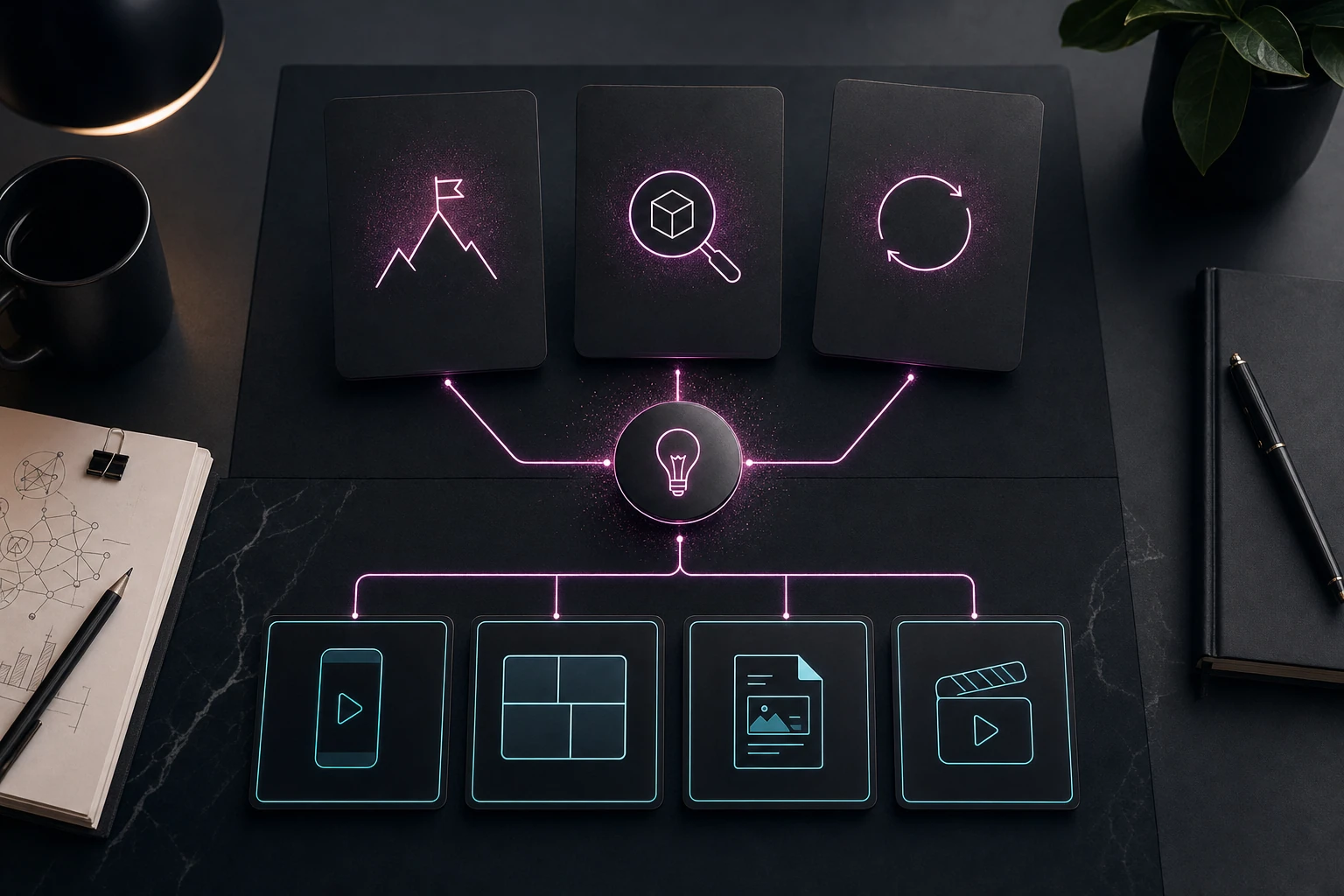
Header image: editorial desk with three cards labeled promise, proof object, repeat rule, arranged like a reusable operating note.
Creator can publish
Do not just save the finished post. Save the promise, proof object, and repeat rule that made it work.
Full packet available
Open the complete brief, hooks, script, structure, visuals, motion/QA pass, edit pass, and release sheet.
Creative Brief
An evergreen newsletter article for creators who save finished posts but lose the system underneath them. The article teaches a repeatable framework - promise, proof object, repeat rule - then shows how the same idea becomes a Short, carousel, article, and clip without duplicating the wording. The piece should feel like a usable operating note, not generic content advice.
Hooks
4 options
A good idea is not one post. It is a production system.
You are saving the post and losing the rule that made it work.
One idea can travel across formats without becoming duplicate content.
If you cannot name the proof object, the idea is not ready to travel.
Article draft
ARTICLE DRAFT A useful idea should not become one post and disappear. If the idea is strong, it has three parts hiding underneath it: a promise, a proof object, and a repeat rule. Most creators save the finished post. They do not save the system that made it work. That is why the next draft starts from zero. Start with the promise. What changes for the reader or viewer after this piece? Do they understand a mistake, notice a pattern, believe a stronger claim, or know what to do next? If you cannot write that in one sentence, the idea is not ready to travel. Then find the proof object. A proof object is the visible thing that makes the promise believable: a screenshot, before-after, short story, data point, comment, template, or demonstration. Without proof, every format becomes the same vague advice in a different wrapper. Finally, extract the repeat rule. The rule is the order you can reuse without copying the wording. Example: show the proof first, name the mistake second, give the fix third. Now translate the idea. For a Short, open on the proof object before naming the lesson. For a carousel, make each card one step in the rule. For an article, explain why the rule works and give examples the reader can apply. For a clip, pull the strongest contrast and let the caption name the system. The goal is not to squeeze one post into four places. The goal is to save the system underneath the post so the next four pieces start half-built.
Article outline
8 sections
Lede - one-off posts waste good ideas because the system is not saved.
Problem section - creators save outputs but not the repeatable decisions behind them.
Promise section - define the reader or viewer change in one sentence.
Proof-object section - name the visible evidence that makes the promise believable.
Repeat-rule section - extract the reusable order without copying wording.
Translation section - show the same idea as Short, carousel, article, and clip.
Example box - proof first, mistake second, fix third applied across two formats.
Conclusion - save the system underneath the post before drafting the next one.
Article visuals
7 assets
Header image: editorial desk with three cards labeled promise, proof object, repeat rule, arranged like a reusable operating note.
Inline diagram: one idea node branching into Short, carousel, article, and clip, with the same repeat rule running through each branch.
Section graphic: promise card asking 'what changes for the viewer?' with three example answers underneath.
Section graphic: proof-object shelf with screenshot, comment, before-after, template, and demo icons.
Rule graphic: three-step order card - proof first, mistake second, fix third - with wording crossed out to show the rule is reusable.
Format translation table: rows for Short, carousel, article, clip; columns for opener, proof, payoff, CTA.
Pull quote: 'Save the system underneath the post' styled as the shareable line.
Editorial QA Pass
4 checks
Skim pass: every section needs a subhead that names the job: promise, proof object, repeat rule, translation.
Example pass: the Short/carousel/article/clip translation table must use one consistent idea, not four generic examples.
Visual placement pass: header image, branch diagram, framework card, and pull quote should each explain a different part of the system.
Reuse pass: the final action must send the reader back to a saved rule, not a vague reminder to create more.
Edit Pass
Lede pass: name promise, proof object, and repeat rule before the reader scrolls.
Specificity pass: every abstract claim needs a concrete creator example or visible proof object.
Structure pass: each section must answer one question and hand off to the next.
Diagram pass: the branching-format diagram must carry real information, not decoration.
Skim pass: bold only the three framework terms and the final operating line.
CTA pass: end with a small action - save the rule before drafting the next post.
Release Sheet
Title
How to Turn One Good Idea Into a Reusable Content System
Thumbnail
One idea node branching into Short, carousel, article, and clip, with 'Save the rule' as the main text.
Caption
Do not just save the finished post. Save the promise, proof object, and repeat rule that made it work.
Hashtags
#contentstrategy #creatoreconomy #writingtips
Pinned comment
Take one recent post and name its promise, proof object, and repeat rule. Which one is hardest?
06 Threads post sequence
Commentary Factory
Format
Threads
Structure
6 posts
Visuals
2 briefs
Production
4 checks
Rough idea
A six-post Threads sequence challenging the advice that creators need more tools to become consistent.
Threads-specific: six complete posts with standalone value and sequence momentum.
Uses a concrete workflow failure instead of generic productivity commentary.
Includes optional media direction and native-format QA without video-only fields.
Creator can record
The productivity advice that slowed me down most was: add one more tool.
Creator can plan
Post 1 - Contrarian opening: name the specific advice and the cost.
Creator can design
Optional media for post 2: a clean before-and-after workflow diagram, five disconnected tools on the left and one packet-to-action path on the right.
Creator can publish
Six native posts ready to publish as a Threads sequence.
Full packet available
Open the complete brief, hooks, script, structure, visuals, motion/QA pass, edit pass, and release sheet.
Creative Brief
A native six-post Threads sequence for solo creators whose production systems have become heavier than the work. The opening makes one debatable claim, the middle uses a concrete before-and-after workflow, and the final post asks for the reader's own constraint. Each post must stand alone in the feed while still creating a reason to continue.
Hooks
4 options
The productivity advice that slowed me down most was: add one more tool.
My creator workflow improved when I deleted half of it.
Consistency was not a motivation problem. It was a handoff problem.
A system is only useful if tired-you can still run it.
Post copy
1. The productivity advice that slowed me down most was: add one more tool. 2. My idea started in Notes, moved to a task app, became a doc, entered a calendar, then died before I recorded it. Every handoff felt organized. Together, they were friction. 3. I replaced that chain with one rule: an idea cannot move unless the next action moves with it. 'Retention video' became 'record the weak opening, mark the drop, explain one fix.' 4. That changed what I saved. I stopped saving topics and started saving production decisions: the promise, the proof object, and the next shot. 5. The smaller system did less. It also shipped more, because I could reopen an idea without reconstructing the plan. 6. What is the one handoff in your workflow where good ideas usually disappear?
Post sequence
6 posts
Post 1 - Contrarian opening: name the specific advice and the cost.
Post 2 - Concrete failure: show the five-tool chain and where the idea died.
Post 3 - Replacement rule: pair every idea with its next physical action.
Post 4 - Useful framework: promise, proof object, next shot.
Post 5 - Payoff: the smaller system ships more because re-entry is easier.
Post 6 - Reply prompt: ask readers to name their highest-friction handoff.
Media briefs
2 briefs
Optional media for post 2: a clean before-and-after workflow diagram, five disconnected tools on the left and one packet-to-action path on the right.
Optional media for post 4: three labeled production blocks - promise, proof object, next shot - with one real example filled in.
Native Format QA
4 checks
Standalone pass: every post must make sense when surfaced without the previous one.
Continuation pass: posts 1-5 end with unresolved pressure or a concrete next step, never 'keep reading.'
Length pass: keep each post comfortably readable on mobile; split the example before it becomes a paragraph wall.
Media pass: attach at most one proof visual; the sequence must still work as text-only Threads content.
Edit Pass
Claim pass: make the first post debatable and specific, not a vague anti-tool opinion.
Proof pass: retain the Notes-to-task-app-to-doc example so the argument earns credibility.
Voice pass: remove numbered-list stiffness from the prose even though the packet keeps post order visible.
Reply pass: ask for a concrete workflow failure, not generic agreement.
Platform pass: no hashtags, title card, thumbnail language, or fake video timing.
Release Sheet
Title
The Advice That Made My Workflow Slower
Thumbnail
Optional workflow diagram showing five disconnected tools becoming one clear production path.
Caption
Six native posts ready to publish as a Threads sequence.
Hashtags
None - keep the sequence native and conversational.
Pinned comment
What is the one handoff where your ideas usually disappear?
07 LinkedIn proof post
Business Factory
Format
LinkedIn post
Structure
7 sections
Visuals
2 briefs
Production
5 checks
Rough idea
A LinkedIn post showing how a small team shipped more by replacing a crowded content calendar with three repeatable formats.
LinkedIn-specific: a complete proof-led post with real operator detail and a credible close.
Separates observed workflow gains from unsupported audience or revenue claims.
Includes document-image direction, readability checks, and a useful discussion prompt.
Creator can record
We cut our content calendar in half. The team shipped more the next month.
Creator can plan
Opening - specific decision and observed operational result.
Creator can design
Primary document visual: cropped content calendar with 40 muted rows collapsing into three color-coded repeatable format lanes.
Creator can publish
A native LinkedIn post with a proof-led opening, operating example, and discussion prompt.
Full packet available
Open the complete brief, hooks, script, structure, visuals, motion/QA pass, edit pass, and release sheet.
Creative Brief
A proof-led LinkedIn post for creator-led teams and marketing operators. The post opens with a specific operational change, shows the old and new workflow, names the measurable production effect without inventing business results, and closes with a practical diagnostic question. It should read like an experienced operator sharing a decision, not a motivational thread reformatted for LinkedIn.
Hooks
4 options
We cut our content calendar in half. The team shipped more the next month.
Our content problem was not a shortage of ideas. It was too many one-off formats.
A 40-row calendar can hide the fact that nothing is ready to produce.
The best planning decision we made was deleting work before assigning it.
Post draft
We cut our content calendar in half. The team shipped more the next month. Not because the remaining ideas were better. Because we stopped treating every idea like a new production system. The old calendar had 40 rows: announcements, trends, founder thoughts, tutorials, reactions, customer stories, and a growing pile labeled 'repurpose.' Every row looked like progress. Each one needed a different brief, proof source, and approval path. We replaced it with three repeatable formats: 1. One customer problem, rebuilt on screen. 2. One operating lesson, supported by a real artifact. 3. One strong post, translated into a different proof format. For every idea, the team had to name the promise, proof object, owner, and next production action before it entered the calendar. The immediate win was not reach. It was fewer stalled drafts, faster approvals, and a calendar that described work we could actually make. If your calendar keeps growing while output stays flat, count how many rows require a brand-new production process. That number may be the real backlog.
Post structure
7 sections
Opening - specific decision and observed operational result.
Tension - explain why 40 planned rows created hidden production debt.
Before - name the mismatched formats and approval paths.
After - present the three repeatable formats as a scannable list.
Operating rule - require promise, proof object, owner, and next action.
Credibility line - distinguish workflow gains from unverified reach claims.
Close - give the reader one diagnostic they can run on their own calendar.
Media briefs
2 briefs
Primary document visual: cropped content calendar with 40 muted rows collapsing into three color-coded repeatable format lanes.
Optional proof image: anonymized workflow board showing promise, proof object, owner, and next action filled in for one piece.
LinkedIn Format QA
5 checks
Opening pass: the result and the decision appear before the first line break.
Proof pass: preserve the 40-row before state and the three-format after state.
Credibility pass: claim workflow improvements only; do not invent reach, leads, or revenue.
Readability pass: use short paragraphs and one purposeful list without turning every sentence into a one-line fragment.
Conversation pass: finish with a diagnostic question the right operator can answer from experience.
Edit Pass
Specificity pass: retain the old format list, approval friction, and four required planning fields.
Authority pass: sound like an operator reporting a decision, not a guru announcing a universal law.
Density pass: keep the post around 200 words and remove repeated claims about simplicity.
Evidence pass: label operational effects honestly; no unsupported performance percentages.
CTA pass: invite a useful diagnosis rather than asking readers to agree or follow.
Release Sheet
Title
We Cut Our Content Calendar in Half
Thumbnail
A crowded 40-row calendar collapsing into three repeatable production lanes.
Caption
A native LinkedIn post with a proof-led opening, operating example, and discussion prompt.
Hashtags
#ContentOperations #CreatorEconomy #MarketingWorkflow
Pinned comment
How many items on your calendar require a completely new production process?
Try it live
Start with a rough idea, or use Spark Ideas if you do not know what to make yet. The packet you build saves to your Vault with the same depth you see here.